
# NodeScript FAQs
# How do I connect my NodeScript graphs to existing services?
By publishing a graph as an HTTP Endpoint.
When you publish an endpoint, it becomes available to be called by other systems and services via HTTP.
There are two ways to publish an endpoint:
- From your Graph - when you publish a graph, you will be given the option to expose it via HTTP and select a method and URL.
- From the endpoints page. This gives you a more powerful way of customising your endpoint and also displays all the endpoints for your workspace together in one place.
# What is NodeScript?
NodeScript is a platform designed to streamline workflow automation and API integration processes. It's a node-based visual programming language that lets users create flow-based graphs for various real-world scenarios.
# What types of systems and services can NodeScript connect with?
Any platform with HTTP API.
NodeScript can also connect to databases that have a HTTP interface.
For databases that do not have HTTP interface an adapter application can be deployed to your cluster. We currently maintain a MongoDB adapter (opens new window), and the list of supported databases will grow in future.
# What is the known limit of NodeScript graphs?
HTTP endpoint limits. Currently all endpoints execute in a shared computation pool and therefore are subject to rate limiting, cpu throttling and maximum available memory. To bypass these limits you'd need to upgrade a plan whereby your endpoints will be deployed to an isolated horizontally scalable cluster.
Data processing limits. NodeScript adds overhead on top of JavaScript runtime, mostly contributed to features like automatic data type conversion, array expansion and scopes. This overhead is insignificant when working with reasonably-sized datasets, but can accumulate significantly when processing tens of thousands of records and above. At that stage micro optimisations and/or batch processing may be required to improve performance.
Data type limits. NodeScript is built primarily for working with JSON data, as well as JavaScript native data types (like typed arrays, dates, etc). Other kinds of data may be trickier to work with.
Graph composition limits. Each graph can contain an arbitrary number of nodes and references an arbitrary number of other modules — this will roughly translate to the size of the compiled code when it is published, but there is no enforced limit.
# What are some typical use cases for NodeScript?
- Prototyping a backend for your frontend application.
- Connecting multiple API services together.
- Creating bots for services like Slack.
- Data manipulation transformation and filtering.
- Creating OAuth flows that require backend.
- Creating webhooks.
# How can I share my NodeScript graphs with other team members?
You can invite your team member to join the workspace the graph is in to allow them access to it. If you and a team member are both already members of the same space, you can simple share the URL.
# What is the difference between saving and publishing a graph?
Both a Save and a Published graph can be accessed and edited by any user with access to its given workspace. Only Published graph however can be used in the outside world, connected to other services, or called in other graphs.
Graphs save automatically, but are published manually.
You may also edit the visibility of published graphs to private or public.
- Private - modules can only be viewed by users in the workspace.
- Public - modules can be viewed by anyone in the NodeScript community.
# What measures are in place to ensure the security of my NodeScript graphs?
Sensitive information like API keys and passwords should be stored in Variables. Variables are encrypted-at-rest, which means nobody will be able to access them if our database is compromised.
However, they are decrypted using your workspace key when the endpoints are invoked, as well as in the editor. The workspace encryption is protected using a widespread Envelope Encryption technique.
Important! Never hard-code sensitive data in your graphs. Everything you put in a graph becomes public domain when the graph is published as an ESM module. Anyone with the link to your published graph will be able to access all the data inside by reading the compiled code.
# Access control
User control and access to graphs is handled on a Workspace basis.
# Will NodeScript be directly integrated with other programming languages in the future?
Nope.
# Are there any limits on the number of nodes I can add to my graph?
Nope.
# Can I schedule my NodeScript graphs to run at specific times?
Yes, there is a "Schedules" tab in the sidebar that will allow you to set up new actions. Select "Add new schedule" and select what to run and when you want to run it.
# How does error handling work in NodeScript?
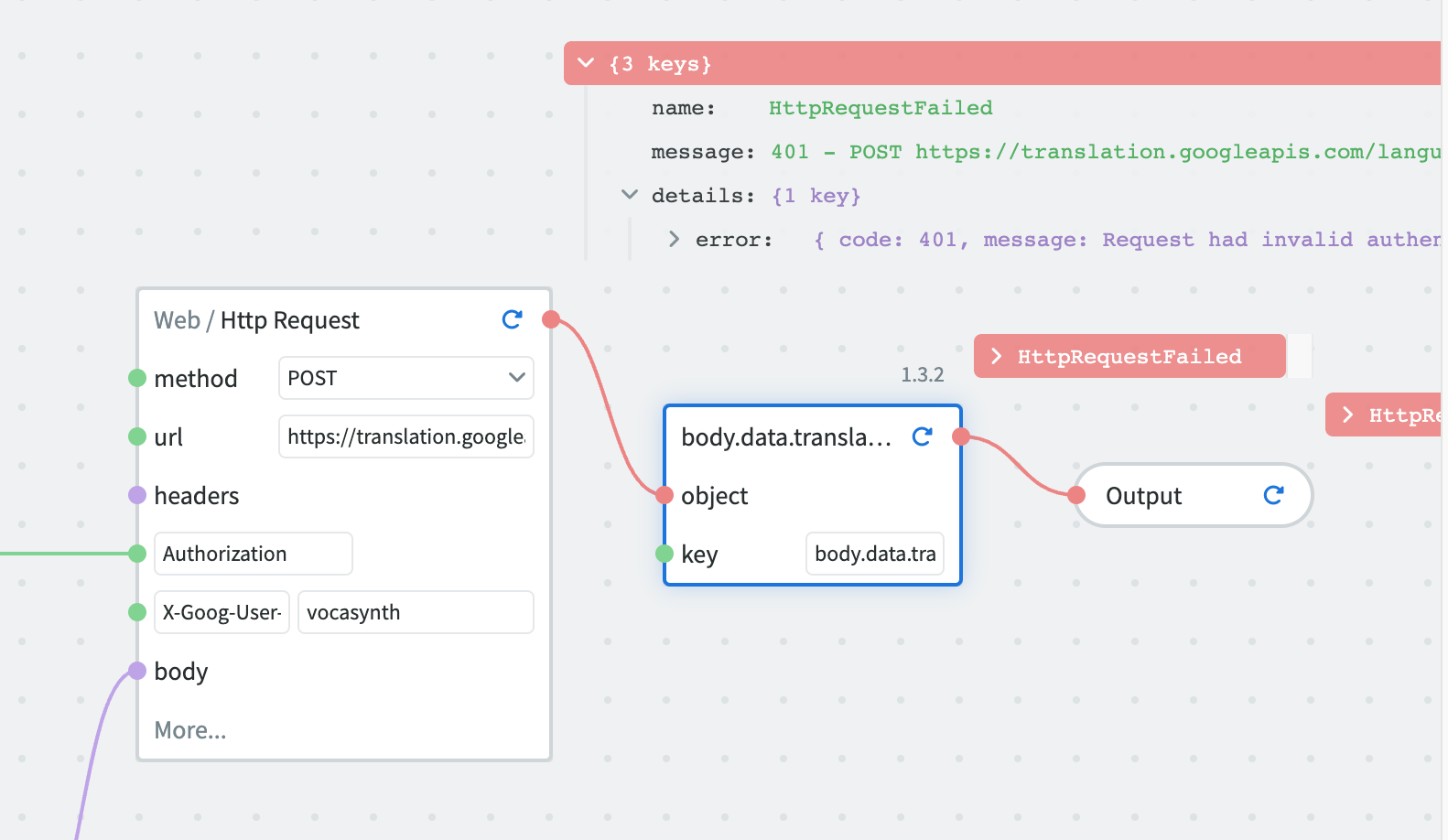
The first and most obvious way to spot an error in a NodeScript by the connection between nodes. If a connection is red, then there is an error in the origin node.
NodeScript also provides an error response. If you make an unauthorized API request for example, an error message will appear to explain the nature of the error.
# Can I create reusable components in NodeScript?
Published graphs/modules can be added as nodes to other graphs of the Workspace.
# What kind of data formats can be processed by NodeScript?
NodeScript is optimised to work with JSON data, as well as JavaScript native data types (like typed arrays, dates, etc). Other kinds of data may be trickier to work with.
# How does NodeScript handle version control and collaboration?
NodeScript features a real time collaboration graph editor. You will instantly see what other users are doing. All the changes are synchronized across collaborators in real time.
Each NodeScript module is versioned separately from the others.
When the graph is published, a new version of the module is created. This version becomes available to other graphs in the editor.
However, endpoints use a point-in-time snapshot of the graph. In order for the changes to graph dependencies to become available in an endpoint, the endpoint needs to be re-published.
# I created a new graph, what next? What do I do first?
Right click or press space bar on the canvas and add your first node.
Refer to our First Graph Guide for more details.
# What happens when I press the "publish" button?
When the graph is published, it is compiled as an EcmaScript module and is published to a centralized registry. This new module version becomes available to other graphs in the editor.
# What do you mean "instant feedback"?
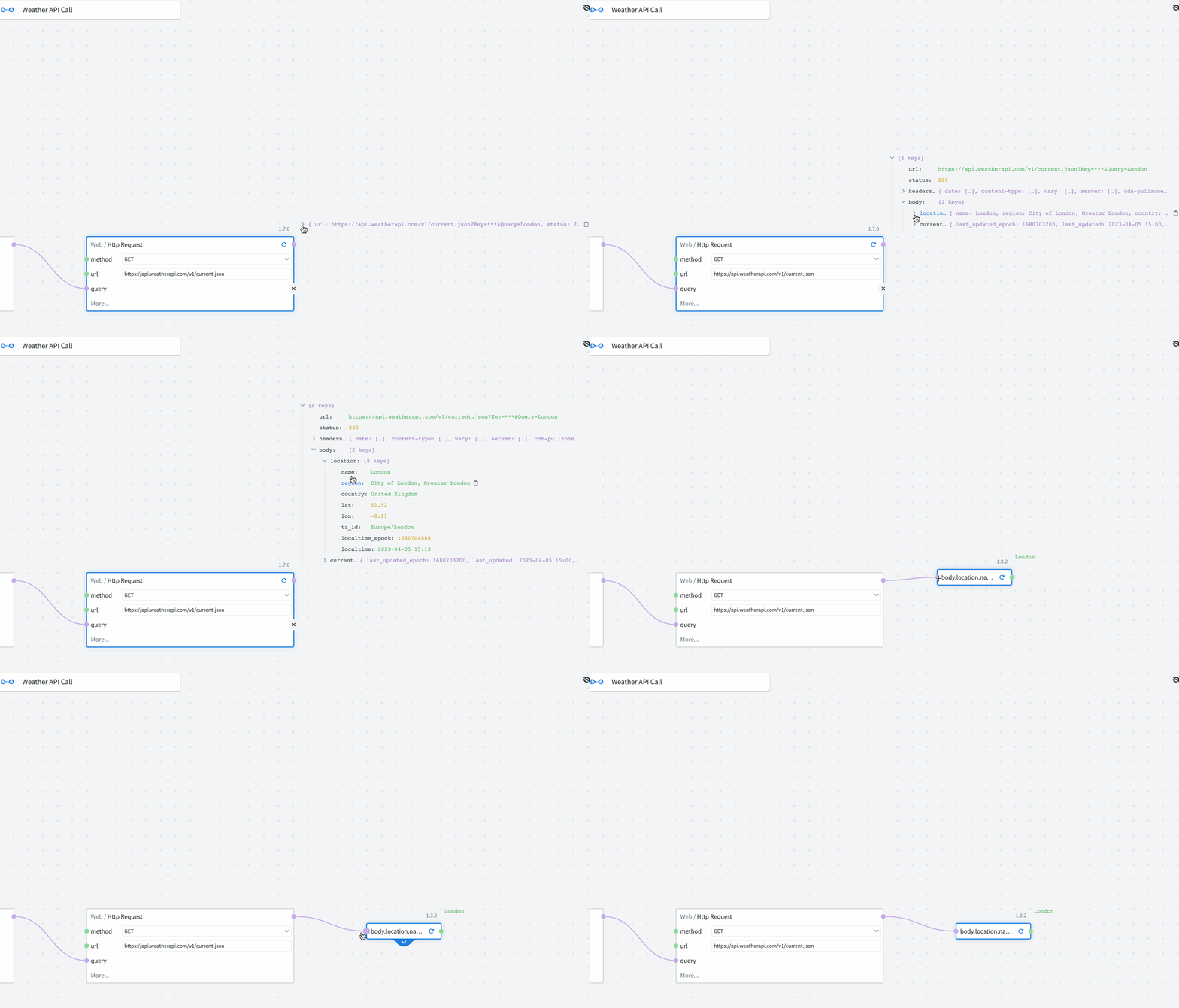
The output of a give node, or module, can be seen above its top right hand corner. This output updates whenever a change is made and the play (or refresh if previously ran) button is triggered.
Attributes of a JSON object can also be instantly accessed via the click and drag function. Whereas with conventional coding, the data would need to be filtered and manipulated, with NodeScript this is a single click.
# Do I need to install any software to use NodeScript?
No, NodeScript requires no dependencies, configuration, or installation and runs directly in your browser.
# How do I sign in to NodeScript?
You can sign in through GitHub or Google authentication. Just click on the sign-in option on the landing page and authorize NodeScript to access your email address.
Alternatively, you can sign in with a Magic Link. Enter your email and click the "Sign in with Magic Link" button on the login page to send an email containing a unique link for you to login with. This link will be valid for 1 hour after sending.
This passwordless process must be repeat on each sign in.
# What is a node in NodeScript?
Nodes are the fundamental building blocks of a graph in NodeScript. Comparable to functions, they perform specific logic based on their inputs to produce outputs. Nodes can be connected using sockets to form more complex logic flows.
# How are nodes categorized in NodeScript?
Nodes in NodeScript are of two types - Standard Library nodes, which are fixed-function nodes provided by NodeScript, and Modules, which are essentially other graphs that can be called upon to perform their specific logic.
# What are modules in NodeScript?
Modules in NodeScript allow users to call other graphs that perform their unique logic. Essentially, modules enable one graph to utilize the logic and functions of another, promoting a modular design approach.
# How do variables work in NodeScript?
In NodeScript, variables are dynamic entities that can store data. They can be used to hold temporary data, define certain configurations, or be used as parameters in functions.
# How do I navigate the NodeScript dashboard?
The dashboard provides an overview of the selected workspace. It has a three-container design: the left container displays workspace details, the center container shows content from the workspace navigation, and the right container provides detailed information on the selected item.
# Can I access multiple workspaces in NodeScript?
Yes, you can choose from any available workspace you have access to using the dropdown menu on the dashboard.
# What is the significance of the home icon on the dashboard?
The home icon in the top right of the dashboard allows you to return to or refresh the workspace.
# Why should I choose NodeScript over traditional coding?
NodeScript offers real-time results, scalable speed, atomic (modular) design, instant work and deployment, automated API calls, and is accessible to developers of all skill levels.
# What kind of support or collaboration features does NodeScript offer for team projects?
NodeScript provides a collaborative environment, allowing multiple users to work on projects simultaneously and share their workflows.
### How do I request a new feature or report a bug?
To request a new feature or report a bug, you can use our support email address support@nodescript.dev. Our team reviews all feedback to continuously improve NodeScript.
### Is there a limit to the number of workspaces I can create or join?
There's no set limit to the number of workspaces you can create or join in NodeScript. This flexibility allows you to organize your projects and collaborations efficiently, depending on your workflow and team size.